PLATINUM EHR · CLINICAL CARE

Chart smarter, deliver better care.

The chiropractic EHR you live in all day — SOAP notes, exams, care plans and progress in one screen, with AI writing the note while you treat.

AI scribe built into the chart HIPAA compliant SOC 2 Type II Built for chiropractic
ROM improving Note saved
SEE IT IN ACTION

The actual screens, not a mock-up.

Five captures from the running product: the chart a provider works in, the outcome report it scores, the day it opens from, what a single appointment can do, and the dashboard every signed note feeds. Pick one — or open any of them full size and read the small print.

Full size
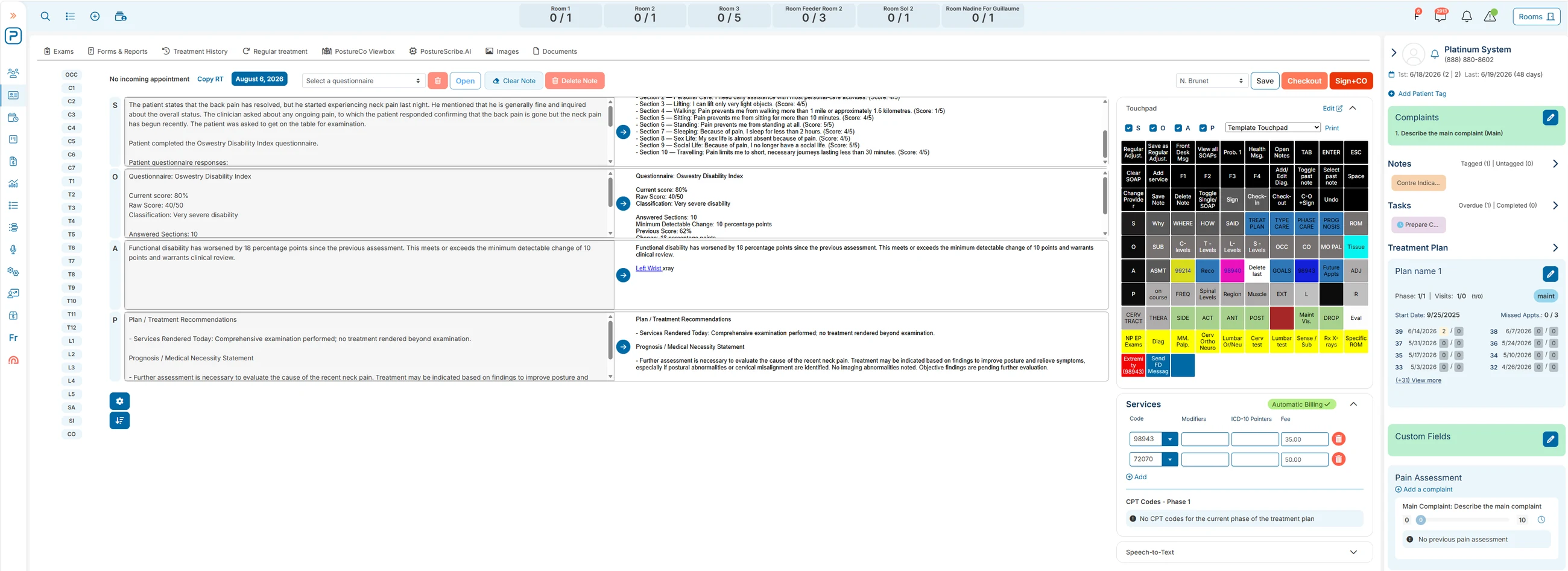
The Platinum EHR chart: a SOAP note shown twice side by side for comparison, a touch-pad macro grid and services list to its right, and a rail carrying complaints, notes, tasks and the treatment plan.
01 · The clinical chart

The whole visit on one screen — and a second copy of it, side by side.

This is the EHR as a provider sees it mid-visit. Room occupancy runs across the top, the note sits in the middle twice over so what was captured can be read against what was refined, and everything you would otherwise go looking for — exams, treatment history, images, documents — is a tab away rather than a screen away.

  1. 1The note appears twice: as captured, and refined into the right SOAP sections. Nothing enters the chart unread.
  2. 2The touch-pad grid is customisable per provider and visit type — one tap writes a full finding when talking isn’t practical.
  3. 3Complaints, notes, tasks, custom fields and the treatment plan stay pinned to the right while you chart.
  4. 4Services and CPT lines fill from the note, so checkout has nothing left to key in.
Full size
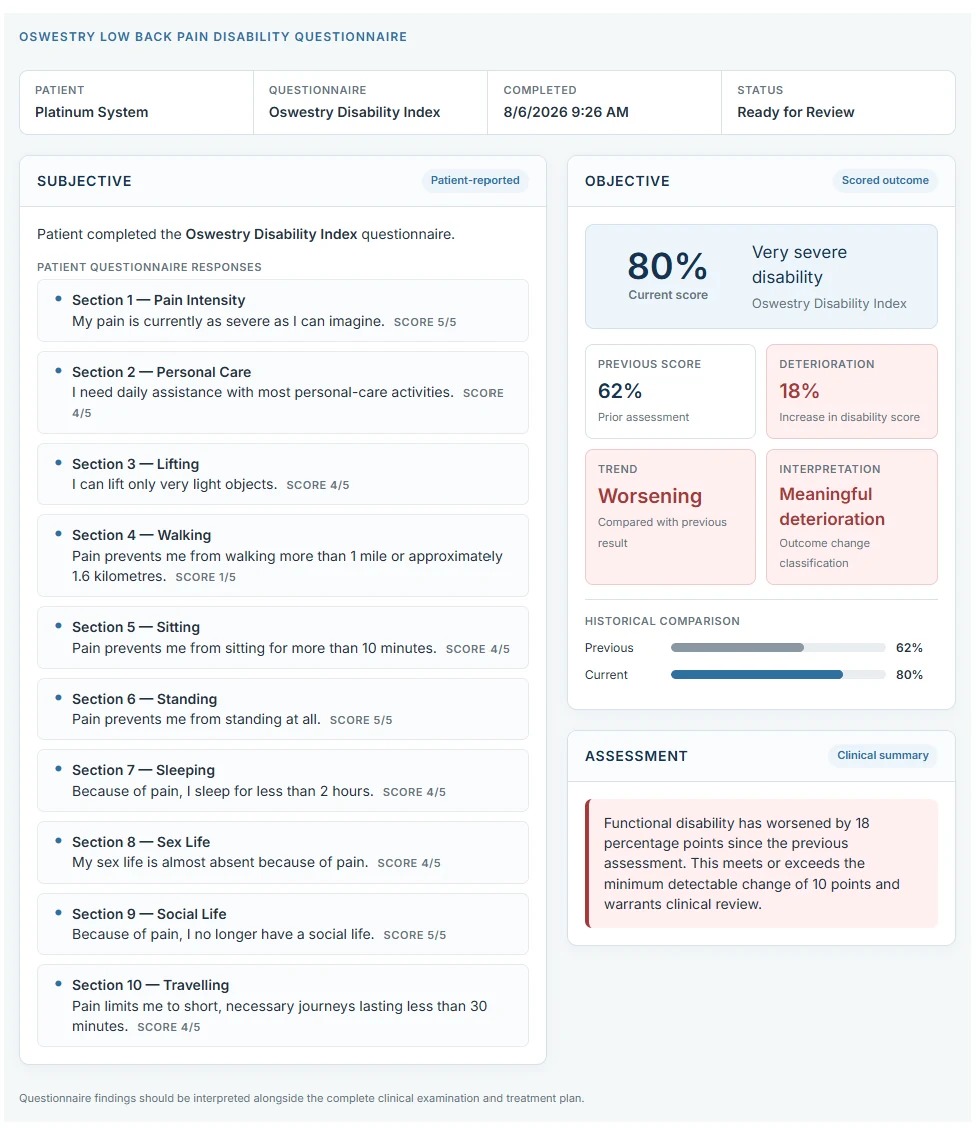
A scored Oswestry Low Back Pain Disability questionnaire: ten answered sections on the left, and on the right the current score of 80 per cent classified as very severe disability, the previous score of 62 per cent, an 18-point deterioration, and a written assessment.
02 · Outcome scoring

The questionnaire comes back scored, classified and already written up.

The patient answers; the chart does the rest. This is what a completed Oswestry Disability Index looks like before you have typed anything — and the same content flows into the note’s subjective, objective and assessment sections rather than sitting in a PDF you have to open.

  1. 1Pain, lifting, walking, sleeping, social life — every section answered and scored.
  2. 280% reads as “very severe disability” on the page, without a lookup table.
  3. 362% → 80%: previous score, the 18-point change and the trend, together.
  4. 4The assessment states the deterioration against the minimum detectable change — the terms a reviewer expects.
Full size
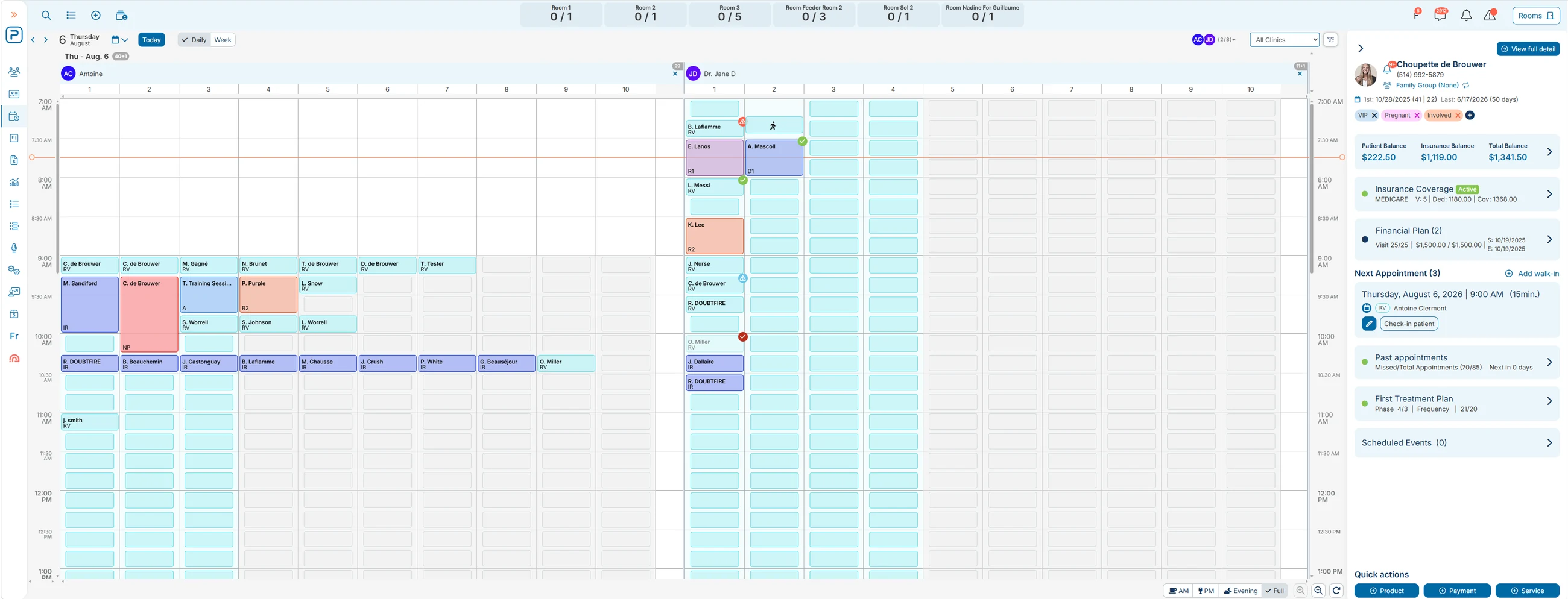
A day in the Platinum schedule: two providers side by side in their own colour-coded columns of appointments, with a patient panel on the right showing balances, insurance coverage, financial plan, next appointment and treatment-plan phase.
03 · The day

Every provider, every room, and the patient’s whole file in one frame.

The screen the chart opens from. Providers sit side by side rather than behind a filter, so the day reads as one picture — and selecting a patient answers the questions the front desk actually gets asked without leaving it.

  1. 1Multiple providers and rooms on one day view, each in their own columns.
  2. 2Appointment types are colour-coded and status ticks show who has checked in.
  3. 3Patient balance, insurance balance and total balance sit at the top of the rail.
  4. 4Coverage, financial plan, past appointments and the current treatment-plan phase — all on the same panel.
Full size
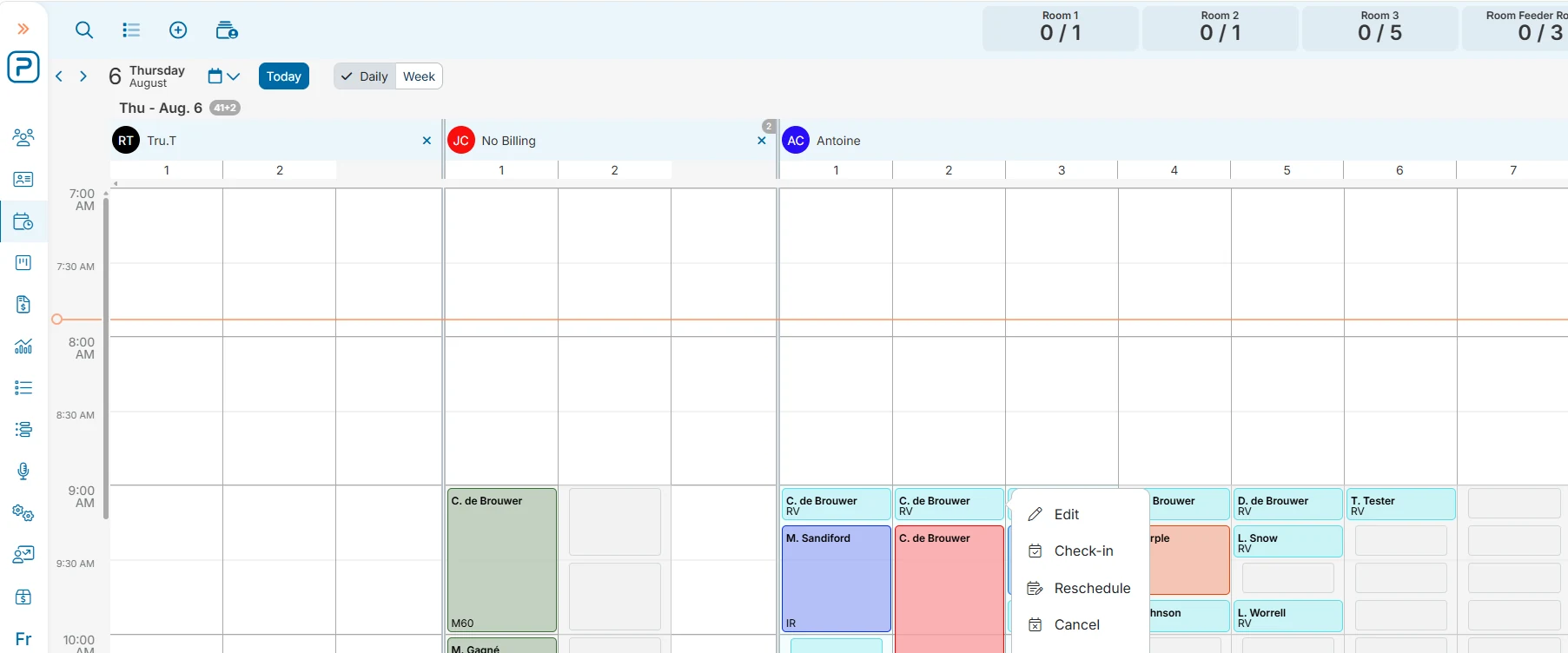
An appointment in the Platinum schedule with its action menu open, offering Edit, Check-in, Reschedule and Cancel, while the surrounding provider columns stay visible.
04 · Appointment actions

Edit, check in, reschedule or cancel — without leaving the day.

The smallest screen here, and the one the front desk touches most. Every action an appointment can take opens on the appointment, so a check-in is one click from where the eye already is — and that click is what puts the patient in front of the provider with the chart already open.

  1. 1Four actions on the slot: edit, check-in, reschedule, cancel.
  2. 2Checking a patient in from here is what opens their chart on the provider’s screen.
  3. 3No screen change and no modal takeover — the surrounding columns stay put.
Full size
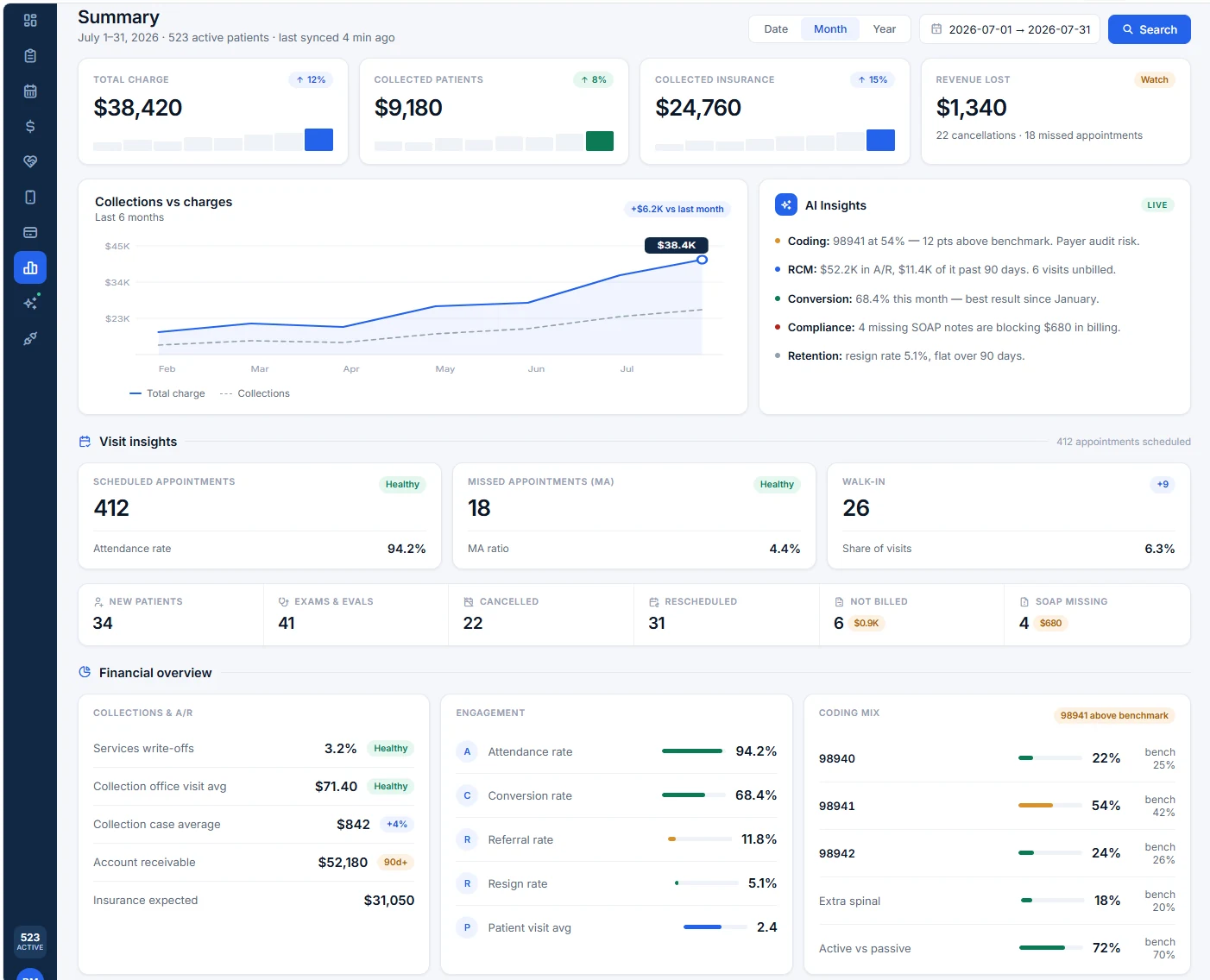
A monthly practice summary in Platinum: total charge, collections and revenue lost across the top, a collections-versus-charges chart, an AI insights panel, visit counts, and a financial overview scoring coding mix against benchmark.
05 · Practice analytics

The month, read back to you from the charts you closed.

Nothing on this page is typed in. Charges, attendance, conversion and coding mix are all built from signed notes and completed visits — which is why the panel can point at four missing SOAP notes holding up billing, or a code running above benchmark, instead of waiting for someone to notice.

  1. 1Total charge, collected from patients, collected from insurance, and revenue lost.
  2. 2Collections against charges over six months — a good month shows as a trend, not a feeling.
  3. 3Coding, A/R, conversion, compliance and retention, each called out with the figure behind it.
  4. 4Every code scored against its benchmark, so drift is visible before an audit finds it.
Hover the capture to magnify it, a note or a pin to see what it marks — or open any capture full size. Screenshots of the running product. Patient names and figures are demonstration data.
Built into every chart
  • SOAP, exam findings & care plan in one place
  • AI scribe writes the note, hands-free
  • CPT codes auto-suggested as you chart
  • ICD-10 codes can be modified for a single visit
  • X-Ray images attached and visible directly in the EHR interface
  • SOAP notes updated directly from subjective and outcome assessment questionnaires
WHAT THE CHART GIVES BACK

Documentation, measured.

Three numbers providers feel in the first week: how long the note takes, how much of the evening it hands back, and how fast the chart closes.

50%
less documentation time

The note stops being a second job that starts when the last patient leaves.

45 min
saved a day

Three quarters of an hour back, every day, without changing how you treat.

faster notes

Most providers finish the chart before the patient is out the door.

EVERYTHING YOU DOCUMENT, IN ONE PLACE

Built for how chiropractors actually chart.

This is the module you use for every patient, all day — so every screen is designed around the chiropractic visit, and around giving you your time back.

THE CORE OF EVERY VISIT

SOAP notes & exam findings

Chiropractic-specific SOAP with exam templates built for how you assess — not a generic medical form.

What it means: a complete, defensible note in a fraction of the time — often finished before the patient leaves the room.

Treatment & care plans

Build chiropractic care plans — visit frequency, phases and goals — and share them with the patient.

What it means: patients understand their plan of care and stick to it, so adherence and outcomes improve.

Care progress tracking

Track pain, range of motion and functional outcomes visit over visit, right in the chart.

What it means: show patients (and payers) measurable progress — and know exactly when to re-exam or discharge.

Patient medical history

A complete, always-current history at your fingertips — every visit, note and image.

What it means: safer, better-informed care without digging through paper or juggling systems.

Clinical attachments

Attach X-rays, intake forms, images and documents directly to the record.

What it means: everything for a patient lives in one place — nothing lost between tools.

AI & AUTOMATION, BUILT IN

The busywork writes itself.

AI isn’t a separate product bolted on top — it’s an integrated layer running inside your chart, so documentation and coding happen as you work.

A clinician working in the chart between visits.
The AI runs inside the chart you already use — not in a separate tool you have to remember to open.

AI Scribe

Not a PDF upload — our AI scribe populates directly in your SOAP note, in the right sections.

Posture, ROM & X-ray analysis

Through our seamless partner integration, AI reads posture, range of motion and X-rays to support your exam and document findings automatically.

AI Assisted coding platform for ICD-10 codes

With just a few words from the patient’s complaints, get a list of appropriate ICD-10 codes.

The scribe drafts. You read it, change anything you want, and sign it — nothing enters the chart until you approve it.

Explore the AI layer
A DAY IN THE PRACTICE

The same chart, three points of view.

One record, one screen — but what it does for you depends on where you stand in the clinic.

Billing is already done when the patient walks back. Visit status, history and the care plan sit on the screen the desk is already using, so nobody carries a paper note down the hall.

  • Billing is automatically done when the patient checks out of the room
  • Visit status, history and care plan are automatically updated — no need to take payment if the patient is under a recurring payment plan. Everything is done automatically
  • Care plan and next visit visible at the desk
  • Nothing re-typed between the room and the front

The chart opens automatically — no click needed as the patient is signed in. The scribe starts listening when you are ready, and you can always draft the note using the touch pad if that is your preferred method. Codes are suggested and you sign before the patient is out the door.

  • Flexible touch pad with multiple macros, fully customizable by provider or visit type
  • Only one click to update the info that is different from the previous visit
  • Prescribe exercises

Every signed note becomes a clean claim and a data point. You can see metrics on efficiency per provider, watch outcomes move, and know the charts are closed before anyone goes home.

  • No delay from notes to billing
  • Patient journey efficiency is tracked by provider
  • One click to retrieve all unsigned SOAP notes
HOW IT WORKS

Four steps to faster documentation.

  1. Visit starts

    Patient is ready, chart is already opened, AI Scribe begins when you say GO. One click to access treatment history and diagnosis. Financial plans are already visible on the screen, including alerts for authorization, medical necessity, etc.

    Nothing to set up
  2. Document in seconds

    SOAP notes auto-generate as you speak and are pushed into the right section. Add exam findings, update diagnoses and adjust care plans — all from one screen.

    Hands stay on the patient
  3. Review & sign

    Review the AI-generated note, complete and edit the SOAP note using the touch pad if desired, and the chart flows directly to billing. No re-entry, no missed charges.

    You sign, always
  4. Confirm next appointment & exercises

    System ensures the next appointment is scheduled. Exercises ensure you stay connected with the patient.

    Care continues at home
BEFORE & AFTER

What changes on Monday.

Nothing about how you treat. Everything about what happens to the note afterwards.

✕  Before Platinum
  • Notes finished after hours, at home
  • Codes looked up in a separate reference
  • Exam findings written once on paper, typed again later
  • Progress described from memory at the re-exam
  • X-rays and intake forms filed somewhere else
✓  With Platinum EHR
  • The note is drafted during the visit
  • Exam findings are pre-populated, no need for manual entry
  • Pain, range of motion and function charted visit over visit
  • Images, forms and documents attached to the record
ONE CONNECTED SYSTEM

EHR connects to everything.

A signed note doesn’t stop at the chart — it flows across the whole platform, automatically, with no duplicate entry and no silos.

QUESTIONS PROVIDERS ASK

Before you switch charts.

No. It drafts. You read the note, change anything you want and sign it yourself. Nothing enters the chart until you approve it.

It flows to billing as a claim, updates the patient’s history, reaches the patient app as a visit summary and feeds the outcome and productivity dashboards — with no second entry.

Yes. X-rays, intake forms, images and documents attach directly to the record, so a patient’s whole file sits in one place.

Pain, range of motion and functional outcomes are tracked visit over visit inside the chart, so you can pull up the trend on screen and show exactly what has changed.

Yes. Platinum is HIPAA compliant and SOC 2 Type II, and the EHR is built for chiropractic from the ground up.

INSIDE THE CLINIC

Real practices, real people.

Charting shouldn’t follow you home. When the note writes itself during the visit, providers finish the day with the patients — not with the paperwork.

A chiropractor going through findings with a patient, spine charts and imaging behind them.
The note is finished in the room, with the patient — not at the kitchen table.

“The biggest benefit has been TIME! We’re not having to do SOAP notes at the end of a shift.”

Dr. Aliya Gard
Gard Wellness Center

“Platinum is the most superior patient management software system on the market. Excellent record keeping.”

Dr. Steve H.
Core Chiropractic Center
SEE IT ON YOUR WORKFLOW

Finish the note before they leave the room.

See Platinum EHR run against a real chiropractic visit — SOAP, coding, care plan and outcomes, on one screen.

HIPAA compliant SOC 2 Type II Built for chiropractic